April 21, 2010I recently some did some benchmarking of persistent data structures in mit-scheme for my UROP. There were a few questions we were interested in:
- For what association sizes does a fancier data structure beat out your plain old association list?
- What is the price of persistence? That is, how many times slower are persistent data structures as compared to your plain old hash table?
- What is the best persistent data structure?
These are by no means authoritative results; I still need to carefully comb through the harness and code for correctness. But they already have some interesting implications, so I thought I’d share. The implementations tested are:
All implementations use eq? for key comparison.
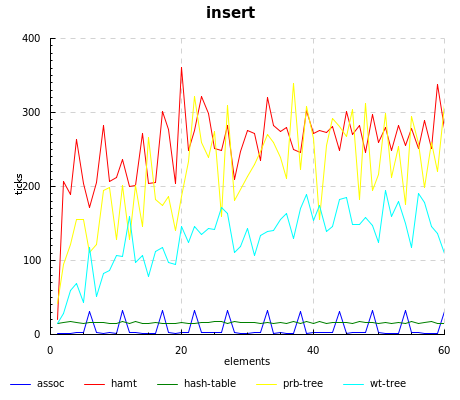
Unsurprisingly, assoc beats out everyone else, since all it has to do is a simple cons. However, there are some strange spikes at regular intervals, which I am not sure of the origin; it might be the garbage collector kicking in.
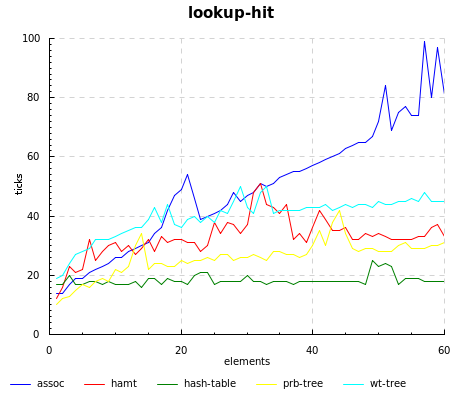
Of course, you pay back the cheap updates in assoc with a linear lookup time; the story also holds true for weight-balanced trees, which have fast inserts but the slowest lookups.
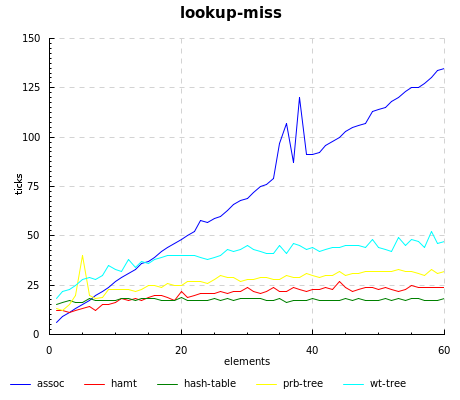
The hamt really flies when the key isn’t present, even beating out hash-tables until 15 elements or so.
Source code for running the benchmarks, our home-grown implementations, and graphing can be found at the scheme-hamt repository.
April 19, 2010In today’s world of social news aggregation websites, ala Reddit, Digg, Slashdot, it is rare for the sole dialog between an author and a reader to take place on a private channel or on one’s website. I discovered this rather bluntly when I found that a document I had written had amassed a number of comments, one of which pointed out an error in what I had written, and then failed to notify me.
These days, there is a certain amount of savvy that needs to be exercised in order to keep track of references on the Internet. Google Alerts, Twitter search, pingbacks… the list goes on and on. If you want to engage in a conversation with someone on the Internet, you’ll probably have to go to the medium they responded on, abide by the social conventions of that site and also risk being totally ignored (although that’s not as bad, since “you got the last word.”) If you’re a small company working carefully to cultivate good public relations around your product, you may even go as far to track down someone’s online identity and send them an email asking them if there’s any way you can help (it has been described as “creepily awesome customer service.”)
Then there’s also the flip side of the coin: to engage in a dialog with your reader, they need to know when you’ve responded! If they commented on their favorite social news site, they’ll get an update stream aggregating all of the other discussions they may be participating in. If they commented on the blog itself, options are far more varied: some blogs (like mine) offer no mechanism of notification when replies have been posted; others may offer “email notifications of replies” but fail to distinguish threads of conversation; some even outsource their discussion to a third-party provider like Disqus.
There are, of course, some who have lost faith in statesmanship over the Internet. Those are the people who you’ll see post essays with only a private email link for one-to-one conversation; those are the people who force their readers to unsponsored discussion on their favorite social media website; those are the people who shake their heads when the an ignorant commenter fails to display any indication that they read the article or know what they are talking about. I think that we can do better, because I’ve seen better! (Wink.) I’ve seen people comment, not because they want to project an image of smugness or superior knowledge, but because there is an earnest dialogue going on between all parties which, most of all, is focused on the transfer of knowledge. I’ve seen it happen on the Internet; I’ve seen it happen in real life; I still fall victim to the impulse to posture and chest-beat. I prefer conversing to people when the goal is to communicate, and not to win an argument. I enjoy arguing with people when I feel there is as much listening happening as there is talking. I love having an audience that consists of people, not an anonymous Internet.
April 16, 2010Conductor and violinist Gustavo Dudamel will be visiting MIT today to accept the Eugene McDermott Award in the Arts. Part of the awards ceremony will include a session with Dudamel conducting the MIT Symphony Orchestra; I’ll be on stage playing Oboe and English Horn on Rimsky Korsakov and Mozart. Our regular conductor (Adam Boyles) has been prepping us for this by taking, erm, unusual liberties in tempo and phrasing.
I’m not usually very aware of names of conductors, but I have heard Dudamel’s float across WQXR on occasion. The evening promises to be exciting.
Non sequitur. You can join PDF files together using pdftk input1.pdf input2.pdf input3.pdf cat output output.pdf. You can also use GhostScript, but this results in quality degradation since the file gets converted to PostScript first. (This may also explain why we keep finding 2.5GB PostScript files filling up our server disks.)
April 14, 2010data-accessor is a package that makes records not suck. Instead of this code:
newRecord = record {field = newVal}
You can write this:
newRecord = field ^= newVal
          $ record
In particular, (field ^= newVal) is now a value, not a bit of extra syntax, that you can treat as a first-class citizen.
I came across this module while attempting to use Chart (of criterion fame) to graph some data. I didn’t recognize it at first, though; it was only after playing around with code samples did I realize that ^= was not a combinator that Chart had invented for its own use (as opposed to the potpourri of -->, <+>, ||| and friends you might see in an xmonad.hs). When utilized with Template Haskell, Data.Accessor represents something of a replacement for the normal record system, and so it’s useful to know when a module speaks this other language. Signs that you’re in a module using Data.Accessor:
- Use of the
^= operator in code samples - All of the records have underscores suffixed, such as
plot_lines_title_ - Template Haskell gobbledygook (including type variables that look like
x[acGI], especially in the “real” accessors that Template Haskell generated). - Unqualified
T data types floating around. (As Brent Yorgey tells me, this is a Henning-ism in which he will define a type T or typeclass C intended to be used only with a qualified import, but Haddock throws away this information. You can use :t in GHC to get back this information if you’re not sure.)
Once you’ve identified that a module is indeed using Data.Accessor, you’ve won most of the battle. Here is a whirlwind tutorial on how to use records that use data-accessor.
Interpreting types. An accessor (represented by the type Data.Accessor.T r a) is defined to be a getter (r -> a) and setter (a -> r -> r). r is the type of the record, and a is the type of the value that can be retrieved or set. If Template Haskell was used to generate the definitions, polymorphic types inside of a and r will frequently be universally quantified with type variables that x[acGI], don’t worry too much about them; you can pretend they’re normal type variables. For the curious, these are generated by the quotation monad in Template Haskell).
Accessing record fields. The old way:
fieldValue = fieldName record
You can do things several ways with Data.Accessor:
fieldValue = getVal fieldname record
fieldValue = record ^. fieldname
Setting record fields. The old way:
newRecord = record {fieldName = newValue}
The new ways:
newRecord = setVal fieldName newValue record
newRecord = fieldName ^= newValue $ record
Accessing and setting sub-record fields. The old ways:
innerValue = innerField (outerField record)
newRecord = record {
  outerField = (outerField record) {
    innerField = newValue
  }
}
The new ways (this is bit reminiscent of semantic editor combinators):
innerValue = getVal (outerField .> innerField) record
newRecord = setVal (outerField .> innerField) newValue record
There are also functions for modifying records inside the state monad, but I’ll leave those explanations for the Haddock documentation. Now go forth and, erm, access your data in style!
April 12, 2010Earlier in January, I blogged some first impressions about the VX-8R. It’s now three months later, and I’ve used my radio on some more extensive field tests. I’m considering selling my VX-8R for a 7R, for the following reasons:
- I generally need five hours of receive with medium transmission. I only get about 3.5 hours worth of receive with the standard VX-8R battery. This is not really acceptable. (At risk of being “get off my lawn”, Karl Ramm comments that his old Icom W32 from the 90s got 12 hours of receive.)
- The AA battery adapter is laughable, giving maybe 20min of receive time before flagging. The ability to run digital cameras on AA batteries had given me the false impression that I’d be able to do the same for a radio, really this adapter is only fit for emergency receive situations.
- The remaining battery indicator unreliable, going from 8.5V to 7.5V, and then dropping straight to zero. This is the defect I sent mine back in for last time, but I saw this problem in the replacement, and a friend confirmed that he saw the same on his.
- The radio gets quite hot during operation. I’d never noticed the temperature with the 7R.
- Everyone else around here owns a 7R, which severely limits the swappability of various components (in particular, batteries).
I really am going to miss the dedicated stereo jack and slimmer (and, in my opinion, better) interface, but these really are deal breakers. C’ést la vie.
April 9, 2010Two people have asked me how drew the diagrams for my previous post You Could Have Invented Zippers, and I figured I’d share it with a little more elaboration to the world, since it’s certainly been a bit of experimentation before I found a way that worked for me.
Diagramming software for Linux sucks. Those of you on Mac OS X can churn out eye-poppingly beautiful diagrams using OmniGraffle; the best we can do is some dinky GraphViz output, or maybe if we have a lot of time, a painstakingly crafted SVG file from Inkscape. This takes too long for my taste.
So, it’s hand-drawn diagrams for me! The first thing I do is open my trusty Xournal, a high-quality GTK-based note-taking application written by Denis Auroux (my former multivariable calculus professor). And then I start drawing.
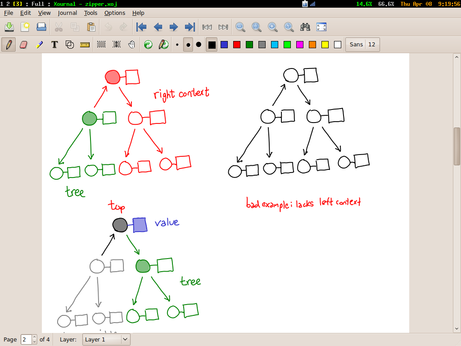
Actually, that’s not quite true; by this time I’ve spent some time with pencil and paper scribbling diagrams and figuring out the layout I want. So when I’m on the tablet, I have a clear picture in my head and carefully draw the diagram in black. If I need multiple versions of the diagram, I copy paste and tweak the colors as I see fit (one of the great things about doing the drawing electronically!) I also shade in areas with the highlighter tool. When I’m done, I’ll have a few pages of diagrams that I may or may not use.
From there, it’s “File > Export to PDF”, and then opening the resulting PDF in Gimp. For a while, I didn’t realize you could do this, and muddled by using scrot to take screen-shots of my screen. Gimp will ask you which pages you want to import; I import all of them.
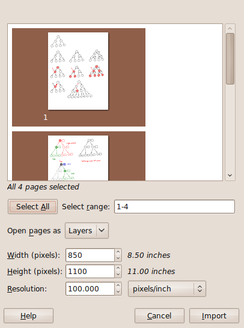
Each page resides on a separate “layer” (which is mildly useless, but not too harmful). I then crop a logical diagram, save-as the result (asking Gimp to merge visible layers), and then undo to get back to the full screen (and crop another selection). When I’m done with a page, I remove it from the visible layers, and move on to the next one.
When it’s all done, I have a directory of labeled images. I resize them as necessary using convert -resize XX% ORIG NEW and then dump them in a public folder to link to.
Postscript. Kevin Riggle reminds me not to mix green and red in the same figure, unless I want to confuse my color blind friends. Xournal has a palette of black, blue, red, green, gray, cyan, lime, pink, orange, yellow and white, which is a tad limiting. I bet you can switch them around, however, by mucking with predef_colors_rgba in src/xo-misc.c
April 7, 2010In the beginning, there was a binary tree:
struct ctree { // c for children
  int val;
  struct ctree *left;
  struct ctree *right;
}
The flow of pointers ran naturally from the root of the tree to the leaves, and it was easy as blueberry pie to walk to the children of a node.
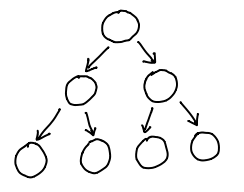
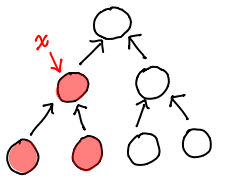
Unfortunately, given a node, there was no good way to find out its parent! If you only needed efficient parent access, though, you could just use a single pointer in the other direction:
struct ptree { // p for parent
  int val;
  struct ptree *parent;
}
The flow of pointers then ran from the leaves of the tree to the root:
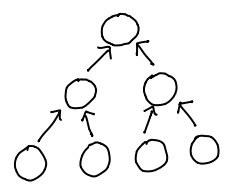
And of course, put together, you could have the best of both worlds:
struct btree {
  int val;
  struct btree *parent;
  struct btree *left;
  struct btree *right;
}
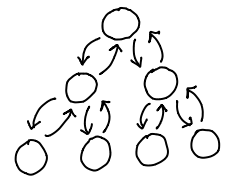
Our data structure had become circular, but as a result we had extremely efficient ways to walk up and down the tree, as well as insert, delete and move nodes, simply by mutating the relevant pointers on our node, its children and its parent.
Trouble in paradise. Pointer tricks are fine and good for the mutable story, but we want immutable nodes. We want nodes that won’t change under our nose because someone else decided to muck around the pointer.
In the case of ctree, we can use a standard practice called path copying, where we only need to change the nodes in the path to the node that changed.
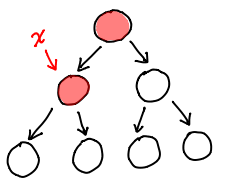
In fact, path copying is just a specific manifestation of the rule of immutable updates: if you replace (i.e. update) something, you have to replace anything that points to it, recursively. In a ptree, we’d need to know the subtree of the updated node and change all of them.
But btree fails pretty spectacularly:
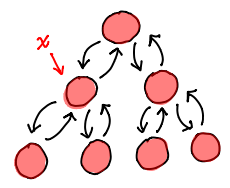
Our web of pointers has meant we need to replace every single node in the tree! The extra circular pointers work to our detriment when looking for a persistent update.
What we’d like to do is somehow combine the ptree and the ctree more intelligently, so we don’t end up with a boat of extra pointers, but we still can find the children and the parent of a node.
Here, we make the critical simplifying assumption: we only care about efficient access of parents and children as well as updates of a single node. This is not actually a big deal in a world of immutable data structures: the only reason to have efficient updates on distinct nodes is to have a modification made by one code segment show up in another, and the point of immutability is to stop that spooky action at a distance.
So, on a single node, we want fast access to the parent and children and fast updates. Fast access means we need pointers going away from this node, fast updates means we need to eliminate pointers going into this node.
Easy! Just flip some pointers (shown in red.)
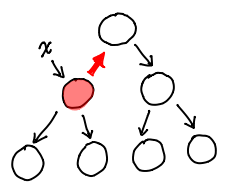
Congratulations, the data structure you see here is what we call a zipper! The only task left for us now is to figure out how we might actually encode this in a struct definition. In the process, we’ll assign some names to the various features inside this diagram.
Let’s consider a slightly more complicated example:
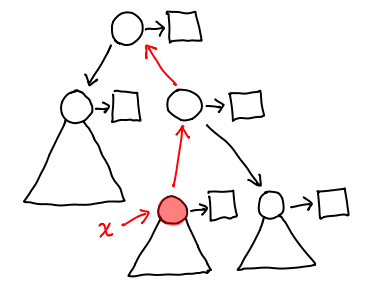
We’ve introduced a few more notational conveniences: triangles represent the tree attached to a given node when we don’t care about any of its subnodes. The squares are the values attached to any given node (we’ve shown them explicitly because the distinction between the node and its data is important.) The red node is the node we want to focus around, and we’ve already gone and flipped the necessary pointers (in red) to make everything else accessible.
When we’re at this location, we can either traverse the tree, or go up the red arrow pointed away from the green node; we’ll call the structure pointed to by this arrow a context. The combination of a tree and a context gives us a location in the zipper.
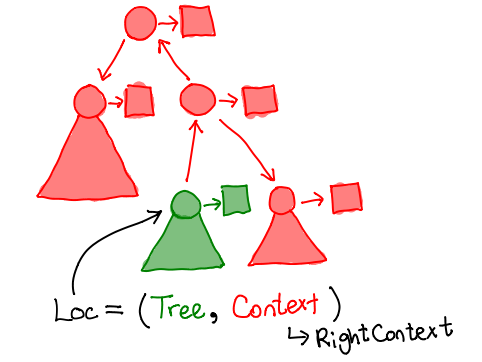
struct loc {
  struct ctree *tree;
  struct context *context;
}
The context, much like the tree, is a recursive data-structure. In the diagram below, it is precisely the node shaded in black. It’s not a normal node, though, since it’s missing one of its child pointers, and may contain a pointer to its own parent.
The particular one that this location contains is a “right context”, that is, the arrow leading to the context points to the right (shown in black in the following diagram).
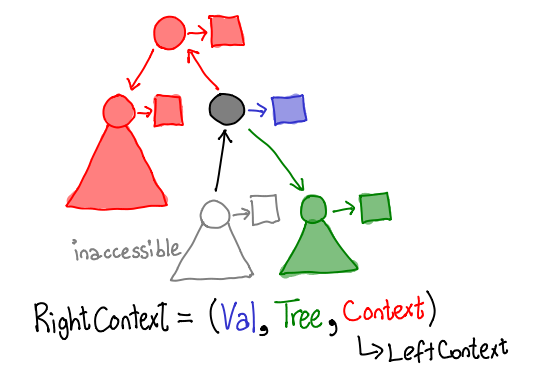
As you can see, for our tree structure, a context contains another context, a tree, and a value.
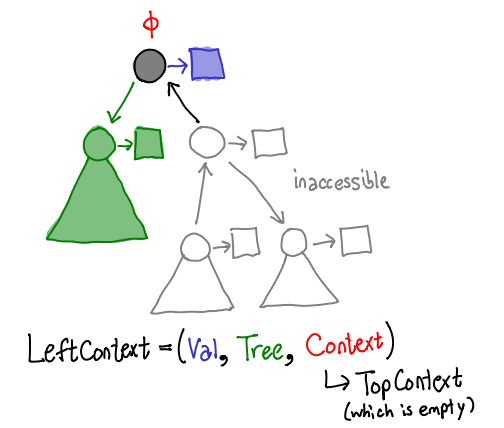
Similarly, a “left context” corresponds to an arrow pointing to the left. It contains the same components, although it may not be quite obvious from the diagram here: where’s the recursive subcontext? Well, since we’re at the top of the tree, instead we have a “top context”, which doesn’t contain any values. It’s the moral equivalent of Nothing.
enum context_type {LEFT, RIGHT, TOP}
struct context {
  enum context_type type;
  // below only filled for LEFT and RIGHT
  int val;
  struct context *context;
  struct ctree *tree;
}
And there we have it! All the pieces you need to make a zipper:
> data Tree a = Nil | Node a (Tree a) (Tree a)
> data Loc a = Loc (Tree a) (Context a)
> data Context a = Top
>                | Left a (Tree a) (Context a)
>                | Right a (Tree a) (Context a)
Exercises:
- Write functions to move up, down-left and down-right our definition of
Tree. - If we had the alternative tree definition
data Tree a = Leaf a | Branch Tree a) (Tree a), how would our context definition change? - Write the data and context types for a linked list.
Further reading: The original crystallization of this pattern can be found in Huet’s paper (PDF), and two canonical sources of introductory material are at Wikibooks and Haskell Wiki. From there, there is a fascinating discussion about how the differentiation of a type results in a zipper! See Conor’s paper (PDF), the Wikibooks article, and also Edward Kmett’s post on using generating functions to introduce more exotic datatypes to the discussion.
April 5, 2010zip: List<A>, List<B> -> List<(A, B)>
zip(Nil, Nil) = Nil
zip(_, Nil) = Nil
zip(Nil, _) = Nil
zip(Cons(a, as), Cons(b, bs)) = Cons((a, b), zip(as, bs))
fst: (A, B) -> A
fst((a, _)) = a
last: List<A> -> A
last(Cons(a, Nil)) = a
last(Cons(a, as)) = last(as)
foldl: (B, A -> B), B, List<A> -> B
foldl(_, z, Nil) = z
foldl(f, z, Cons(x, xs)) = foldl(f, f(z, x), xs)
Good grief Edward, what do you have there? It’s almost as if it were some bastardized hybrid of Haskell, Java and ML.
It actually is a psuedolanguage inspired by ML that was invented by Daniel Jackson. It is used by MIT course 6.005 to teach its students functional programming concepts. It doesn’t have a compiler or a formal specification (although I hear the TAs are frantically working on one as a type this), though the most salient points of its syntax are introduced in lecture 10 (PDF) when they start discussing how to build a SAT solver.
Our second problem set asks us to write some code in this pseudolanguage. Unfortunately, being a pseudolanguage, you can’t actually run it… and I hate writing code that I can’t run. But it certainly looks a lot like Haskell… just a bit more verbose, that’s all. I asked the course staff if I could submit the problem set in Haskell, and they told me, “No, since the course staff doesn’t know it. But if it’s as close to this language as you claim, you could always write it in Haskell and then translate it to this language when you’re done.”
So I did just that.
The plan wouldn’t really have been possible without the existence of an existing pretty printer for Haskell to do most of the scaffolding for me. From there, it was mucking about with <>, lparen and comma and friends in the appropriate functions for rendering data-types differently. Pretty printing combinators rock!
April 2, 2010I’m happy to report that I’ll be interning at Galois over the summer. I’m not quite sure how the name of the company passed into my consciousness, but at some point in January I decided it would be really cool to work at an all-Haskell shop, and began pestering Don Stewart (and Galois’s HR) for the next two months.
I’ll be working on some project within Cryptol; there were a few specific project ideas tossed around though it’s not clear if they’ll have already finished one of my projects by the time the summer rolls around. I’m also really looking forward to working in an environment with a much higher emphasis towards research, since I need to figure out if I’m going to start gunning for a PhD program at the end of my undergraduate program.
Hello, Portland! I can’t wait. :-)
March 31, 2010Code written by Anders Kaseorg.
In The Three Projections of Doctor Futamura, Dan Piponi treats non-programmers to an explanation to the Futamura projections, a series of mind-bending applications of partial evaluation. Go over and read it if you haven’t already; this post is intended as a spiritual successor to that one, in which we write some Haskell code.
The pictorial type of a mint. In the original post, Piponi drew out machines which took various coins, templates or other machines as inputs, and gave out coins or machines as outputs. Let’s rewrite the definition in something that looks a little bit more like a Haskell type.
First, something simple: the very first machine that takes blank coins and mints new coins.
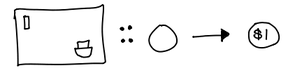
We’re now using an arrow to indicate an input-output relationship. In fact, this is just a function that takes blank coins as input, and outputs engraved coins. We can generalize this with the following type synonym:
> type Machine input output = input -> output
What about that let us input the description of the coin? Well, first we need a simple data type to represent this description:
> data Program input output = Program
(Yeah, that data-type can’t really do anything interesting. We’re not actually going to be writing implementations for these machines.) From there, we have our next “type-ified’ picture of the interpreter:
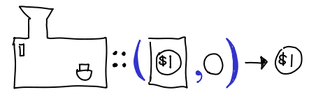
Or, in code:
> type Interpreter input output = (Program input output, input) -> output
From there, it’s not a far fetch to see what the compiler looks like:
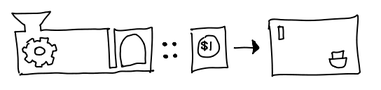
> type Compiler input output = Program input output -> Machine input output
I would like to remark that we could have fully written out this type, as such:
type Compiler input output = Program input output -> (input -> output)
We’ve purposely kept the unnecessary parentheses, since Haskell seductively suggests that you can treat a -> b -> c as a 2-ary function, when we’d like to keep it distinct from (a, b) -> c.
And at last, we have the specializer:
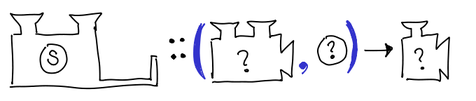
> type Specializer program input output =
>     ((program, input) -> output, program) -> (input -> output)
We’ve named the variables in our Specializer type synonym suggestively, but program doesn’t just have to be Program: the whole point of the Futamura projections is that we can put different things there. The other interesting thing to note is that any given Specializer needs to be parametrized not just on the input and output, but the program it operates on. That means the concrete type that the Specializer assumes varies depending on what we actually let program be. It does not depend on the first argument of the specializer, which is forced by program, input and output to be (program, input) -> output.
Well, what are those concrete types? For this task, we can ask GHC.
To the fourth projection, and beyond! First, a few preliminaries. We’ve kept input and output fully general in our type synonyms, but we should actually fill them in with a concrete data type. Some more vacuous definitions:
> data In = In
> data Out = Out
>
> type P = Program In Out
> p :: P
> p = undefined
>
> type I = Interpreter In Out
> i :: I
> i = undefined
We don’t actually care how we implement our program or our interpreter, thus the undefined; given our vacuous data definitions, there do exist valid instances of these, but they don’t particularly increase insight.
> s :: Specializer program input output
> -- s (x, p) i = x (p, i)
> s = uncurry curry
We’ve treated the specializer a little differently: partial evaluation and partial application are very similar: in fact, to the outside user they do precisely the same thing, only partial evaluation ends up being faster because it is actually doing some work, rather than forming a closure, with the intermediate argument hanging around in limbo and not doing any useful work. However, we need to uncurry the curry, since Haskell functions are curried by default.
Now, the Futamura projections:
> type M = Machine In Out
> m :: M
> m = s1 (i, p)
Without the monomorphism restriction, s would have worked just as well, but we’re going to give s1 an explicit type shortly, and that would spoil the fun for the rest of the projections. (Actually, since we gave s an explicit type, the monomorphism restriction wouldn’t apply.)
So, what is the type of s1? It’s definitely not general: i and p are fully explicit, and Specializer doesn’t introduce any other polymorphic types. This should be pretty easy to tell, but we’ll ask GHC just in case:
Main> :t s1
s1 :: ((P, In) -> Out, P) -> In -> Out
Of course. It matches up with our variable names!
> type S1 = Specializer P In Out
> s1 :: S1
> s1 = s
Time for the second Futamura projection:
> type C = Compiler In Out
> c :: C
> c = s2 (s1, i)
Notice I’ve written s2 this time around. That’s because s1 (s1, i) doesn’t typecheck; if you do the unification you’ll see the concrete types don’t line up. So what’s the concrete type of s2? A little more head-scratching, and perhaps a quick glance at Piponi’s article will elucidate the answer:
> type S2 = Specializer I P M
> s2 :: S2
> s2 = s
The third Futamura projection, the interpreter-to-compiler machine:
> type IC = I -> C
> ic :: IC
> ic = s3 (s2, s1)
(You should verify that s2 (s2, s1) and s1 (s1, s2) and any permutation thereof doesn’t typecheck.) We’ve also managed to lose any direct grounding with the concrete:: there’s no p or i to be seen. But s2 and s1 are definitely concrete types, as we’ve shown earlier, and GHC can do the unification for us:
Main> :t s3
s3 :: ((S1, I) -> C, S1) -> I -> Program In Out -> In -> Out
In fact, it’s been so kind as to substitute some of the more gnarly types with the relevant type synonyms for our pleasure. If we add some more parentheses and take only the output:
I -> (Program In Out -> (In -> Out))
And there’s our interpreter-to-compiler machine!
> type S3 = Specializer S1 I C
> s3 :: S3
> s3 = s
But why stop there?
> s1ic :: S1 -> IC
> s1ic = s4 (s3, s2)
>
> type S4 = Specializer S2 S1 IC
> s4 :: S4
> s4 = s
Or even there?
> s2ic :: S2 -> (S1 -> IC)
> s2ic = s5 (s4, s3)
>
> type S5 = Specializer S3 S2 (S1 -> IC)
> s5 :: S5
> s5 = s
>
> s3ic :: S3 -> (S2 -> (S1 -> IC))
> s3ic = s6 (s5, s4)
>
> type S6 = Specializer S4 S3 (S2 -> (S1 -> IC))
> s6 :: S6
> s6 = s
And we could go on and on, constructing the nth projection using the specializers we used for the n-1 and n-2 projections.
This might seem like a big bunch of type-wankery. I don’t think it’s just that.
Implementors of partial evaluators care, because this represents a mechanism for composition of partial evaluators. S2 and S1 could be different kinds of specializers, with their own strengths and weaknesses. It also is a vivid demonstration of one philosophical challenge of the partial-evaluator writer: they need to write a single piece of code that can work on arbitrary n in Sn. Perhaps in practice it only needs to work well on low n, but the fact that it works at all is an impressive technical feat.
For disciples of partial application, this is something of a parlor trick:
*Main> :t s (s,s) s
s (s,s) s
  :: ((program, input) -> output) -> program -> input -> output
*Main> :t s (s,s) s s
s (s,s) s s
  :: ((input, input1) -> output) -> input -> input1 -> output
*Main> :t s (s,s) s s s
s (s,s) s s s
  :: ((input, input1) -> output) -> input -> input1 -> output
*Main> :t s (s,s) s s s s
s (s,s) s s s s
  :: ((input, input1) -> output) -> input -> input1 -> output
*Main> :t s (s,s) s s s s s
s (s,s) s s s s s
  :: ((input, input1) -> output) -> input -> input1 -> output
But this is a useful parlor trick: somehow we’ve managed to make an arbitrarily variadic function! I’m sure this technique is being used somewhere in the wild, although as of writing I couldn’t find any examples of it (Text.Printf might, although it was tough to tell this apart from their typeclass trickery.)