January 24, 2012The MonadIO problem is, at the surface, a simple one: we would like to take some function signature that contains IO, and replace all instances of IO with some other IO-backed monad m. The MonadIO typeclass itself allows us to transform a value of form IO a to m a (and, by composition, any function with an IO a as the result). This interface is uncontroversial and quite flexible; it’s been in the bootstrap libraries ever since it was created in 2001 (originally in base, though it migrated to transformers later). However, it was soon discovered that when there were many functions with forms like IO a -> IO a, which we wanted to convert into m a -> m a; MonadIO had no provision for handling arguments in the negative position of functions. This was particularly troublesome in the case of exception handling, where these higher-order functions were primitive. Thus, the community began searching for a new type class which captured more of IO.
While the semantics of lift were well understood (by the transformer laws), it wasn’t clear what a more powerful mechanism looked like. So, early attacks at the problem took the approach of picking a few distinguished functions which we wanted, placing them in a typeclass, and manually implementing lifted versions of them. This lead to the development of the already existing MonadError class into a more specialized MonadCatchIO class. However, Anders Kaseorg realized that there was a common pattern to the implementation of the lifted versions of these functions, which he factored out into the MonadMorphIO class. This approach was refined into the MonadPeelIO and MonadTransControlIO typeclasses. However, only MonadError was in the core, and it had failed to achieve widespread acceptance due to some fundamental problems.
I believe it is important and desirable for the community of library writers to converge on one of these type classes, for the primary reason that it is important for them to implement exception handling properly, a task which is impossible to do if you want to export an interface that requires only MonadIO. I fully expected monad-control to be the “winner”, being the end at a long lineage of type classes. However, I think it would be more accurate to describe MonadError and MonadCatchIO as one school of thought, and MonadMorphIO, MOnadPeelIO and MonadTransControlIO as another.
In this blog post, I’d like to examine and contrast these two schools of thought. A type class is an interface: it defines operations that some object supports, as well as laws that this object abides by. The utility in a type class is both in its generality (the ability to support multiple implementations with one interface) as well as its precision (the restriction on permissible implementations by laws, making it easier to reason about code that uses an interface). This is the essential tension: and these two schools have very different conclusions about how it should be resolved.
This general technique can be described as picking a few functions to generalize in a type class. Since a type class with less functions is preferable to one with more (for generality reasons), MonadError and MonadCatchIO have a very particular emphasis on exceptions:
class (Monad m) => MonadError e m | m -> e where
  throwError :: e -> m a
  catchError :: m a -> (e -> m a) -> m a

class MonadIO m => MonadCatchIO m where
  catch   :: Exception e => m a -> (e -> m a) -> m a
  block   :: m a -> m a
  unblock :: m a -> m a
Unfortunately, these functions are marred by some problems:
- MonadError encapsulates an abstract notion of errors which does not necessarily include asynchronous exceptions. That is to say,
catchError undefined h will not necessarily run the exception handler h. - MonadError is inadequate for robust handling of asynchronous exceptions, because it does not contain an interface for
mask; this makes it difficult to write bracketing functions robustly. - MonadCatchIO explicitly only handles asynchronous exceptions, which means any pure error handling is not handled by it. This is the “finalizers are sometimes skipped” problem.
- MonadCatchIO, via the
MonadIO constraint, requires the API to support lifting arbitrary IO actions to the monad (whereas a monad designer may create a restricted IO backed monad, limiting what IO actions the user has access to.) - MonadCatchIO exports the outdated
block and unblock function, while modern code should use mask instead. - MonadCatchIO exports an instance for the
ContT transformer. However, continuations and exceptions are known to have nontrivial interactions which require extra care to handle properly.
In some sense, MonadError is a non-sequitur, because it isn’t tied to IO at all; perfectly valid instances of it exist for non-IO backed monads as well. MonadCatchIO is closer; the latter three points are not fatal ones could be easily accounted for:
class MonadException m where
  throwM  :: Exception e => e -> m a
  catch   :: Exception e => m a -> (e -> m a) -> m a
  mask    :: ((forall a. m a -> m a) -> m b) -> m b
(With a removal of the ContT instance.) However, the “finalizers are sometimes skipped” problem is a bit more problematic. In effect, it is the fact that there may exist zeros which a given instance of MonadCatchIO may not know about. It has been argued that these zeros are none of MonadCatchIO’s business; one inference you might draw from this is that if you have short-circuiting which you would like to respect finalizers installed using MonadException, it should be implemented using asynchronous exceptions. In other words, ErrorT is a bad idea.
However, there is another perspective you can take: MonadException is not tied just to asynchronous exceptions, but any zero-like value which obeys the same laws that exceptions obey. The semantics of these exceptions are described in the paper Asynchronous Exceptions in Haskell. They specify exactly the interaction of masking, throw and catch, as well as how interrupts can be introduced by other threads. In this view, whether or not this behavior is prescribed by the RTS or by passing pure values around is an implementation detail: as long as an instance is written properly, zeros will be properly handled. This also means that it is no longer acceptable to provide a MonadException instance for ErrorT e, unless we also have an underlying MonadException for the inner monad: we can’t forget about exceptions on the lower layers!
There is one last problem with this approach: once the primitives have been selected, huge swaths of the standard library have to be redefined by “copy pasting” their definitions but having them refer to the generalized versions. This is a significant practical hurdle for implementing a library based on this principle: it’s simply not enough to tack a liftIO to the beginning of a function!
I think an emphasis on the semantics of the defined type class will be critical for the future of this lineage of typeclasses; this is an emphasis that hasn’t really existed in the past. From this perspective, we define with our typeclass not only a way to access otherwise inaccessible functions in IO, but also how these functions should behave. We are, in effect, modeling a subset of IO. I think Conal Elliott would be proud.
There is a lively debate going on about extensions to the original semantics of asynchronous exceptions, allowing for the notion of “recoverable” and “unrecoverable” errors. (It’s nearer to the end of the thread.)
This technique can be described as generalizing the a common implementation technique which was used to implement many of the original functions in MonadCatchIO. These are a rather odd set of signatures:
class Monad m => MonadMorphIO m where
  morphIO :: (forall b. (m a -> IO b) -> IO b) -> m a

class MonadIO m => MonadPeelIO m where
  peelIO :: m (m a -> IO (m a))

class MonadBase b m => MonadBaseControl b m | m -> b where
  data StM m :: * -> *
  liftBaseWith :: (RunInBase m b -> b a) -> m a
  restoreM :: StM m a → m a
type RunInBase m b = forall a. m a -> b (StM m a)
The key intuition behind these typeclasses is that they utilize polymorphism in the IO function that is being lifted in order to thread the pure effects of the monad stack on top of IO. You can see this as the universal quantification in morphIO, the return type of peelIO (which is IO (m a), not IO a), and the StM associated type in MonadBaseControl. For example, Int -> StateT s IO a, is equivalent to the type Int -> s -> IO (s, a). We can partially apply this function with the current state to get Int -> IO (s, a); it should be clear then that as long as the IO function we’re lifting lets us smuggle out arbitrary values, we can smuggle out our updated state and reincorporate it when the lifted function finishes. The set of functions which are amenable to this technique are precisely the ones for which this threaded is possible.
As I described in this post, this means that you won’t be able to get any transformer stack effects if they aren’t returned by the function. So perhaps a better word for MonadBaseControl is not that it is unsound (although it does admit strange behavior) but that it is incomplete: it cannot lift all IO functions to a form where the base monad effects and the transformer effects always occur in lockstep.
This has some interesting implications. For example, this forgetfulness is in fact precisely the reason why a lifted bracketing function will always run no matter if there are other zeros: finally by definition is only aware of asynchronous exceptions. This makes monad-control lifted functions very explicitly only handling asynchronous exceptions: a lifted catch function will not catch an ErrorT zero. However, if you manually implement finally using lifted versions of the more primitive functions, finalizers may be dropped.
It also suggests an alternate implementation strategy for monad-control: rather than thread the state through the return type of a function, it could instead be embedded in a hidden IORef, and read out at the end of the computation. In effect, we would like to embed the semantics of the pure monad transformer stack inside IO. Some care must be taken in the forkIO case, however: the IORefs need to also be duplicated appropriately, in order to maintain thread locality, or MVars used instead, in order to allow coherent non-local communication.
It is well known that MonadBaseControl does not admit a reasonable instance for ContT. Mikhail Vorozhtsov has argued that this is too restrictive. The difficulty is that while unbounded continuations do not play nice with exceptions, limited use of continuation passing style can be combined with exceptions in a sensible way. Unfortunately, monad-control makes no provision for this case: the function it asks a user to implement is too powerful. It seems the typeclasses explicitly modeling a subset of IO are, in some sense, more general! It also highlights the fact that these type classes are first and foremost driven by an abstraction of a common implementation pattern, rather than any sort of semantics.
I hope this essay has made clear why I think of MonadBaseControl as an implementation strategy, and not as a reasonable interface to program against. MonadException is a more reasonable interface, which has a semantics, but faces significant implementation hurdles.
January 23, 2012Editor’s note. I’ve toned down some of the rhetoric in this post. The original title was “monad-control is unsound”.
MonadBaseControl and MonadTransControl, from the monad-control package, specify an appealing way to automatically lift functions in IO that take “callbacks” to arbitrary monad stacks based on IO. Their appeal comes from the fact that they seem to offer a more general mechanism than the alternative: picking some functions, lifting them, and then manually reimplementing generic versions of all the functions built on top of them.
Unfortunately, monad-control has rather surprising behavior for many functions you might lift.
For example, it doesn’t work on functions which invoke the callback multiple times:
{-# LANGUAGE FlexibleContexts #-}

import Control.Monad.Trans.Control
import Control.Monad.State

double :: IO a -> IO a
double m = m >> m

doubleG :: MonadBaseControl IO m => m a -> m a
doubleG = liftBaseOp_ double

incState :: MonadState Int m => m ()
incState = get >>= \x -> put (x + 1)

main = execStateT (doubleG (incState)) 0 >>= print
The result is 1, rather than 2 that we would expect. If you are unconvinced, suppose that the signature of double was Identity a -> Identity a, e.g. a -> a. There is only one possible implementation of this signature: id. It should be obvious what happens, in this case.
If you look closely at the types involved in MonadBaseControl, the reason behind this should become obvious: we rely on the polymorphism of a function we would like to lift in order to pass StM m around, which is the encapsulated “state” of the monad transformers. If this return value is discarded by IO, as it is in our function double, there is no way to recover that state. (This is even alluded to in the liftBaseDiscard function!)
My conclusion is that, while monad-control may be a convenient implementation mechanism for lifted versions of functions, the functions it exports suffer from serious semantic incoherency. End-users, take heed!
Postscript. A similar injunction holds for the previous versions of MonadBaseControl/MonadTransControl, which went by the names MonadPeel and MonadMorphIO.
January 16, 2012It can be hard to understand the appeal of spending three days, without sleep, solving what some have called “the hardest recreational puzzles in the world,”; but over this weekend, hundreds of people converged on the MIT campus to do just that, as part of MIT Mystery Hunt. To celebrate the finding of the coin, I’d like to share this little essay that I found in my files, which compares Mystery Hunt and the scientific endeavour. (If you are not familiar with Mystery Hunt, I recommend listening to the linked This American Life program.)
Thomas Kuhn, in his famous book The Structure of Scientific Revolutions, states that “normal science” is “puzzle solving”: what he means is that the every day endeavors of scientists are the addressing of small, tractable problems, these problems are “puzzles” not “grand mysteries of the universe.” Kuhn goes on to describe what is involved with normal science: generation of facts, increasing the fit between theory and observation, and paradigm articulation. We will see that, as one might expect, these activities are part of “normal” puzzle solving. But (perhaps more unexpectedly) Popperian falsification and Kuhnian revolutions also have something to say about this situation. There are limits to the analogy of puzzles to science, the perhaps most striking of which is that a puzzle has a single, definite solution. But because it is not possible to call up the puzzle writers midway through a puzzle and ask them, “Am I on the right track?” (you are only allowed to phone in the final answer) the intermediate steps still are somewhat informative of the practice of science. In this context, I argue that Popper assumes a microscopic view of scientific progress, whereas Kuhn assumes a macroscopic view of scientific progress.
What is a Mystery Hunt puzzle? This is a question that, at first glance, may seem to defy answering: puzzles can vary from a crossword to an album of images of birds to a single audio file of seemingly random electronic pitches. The answer is always a phrase, perhaps “KEPLERS THIRD LAW” or “BOOTS,” but a puzzle, like a scientific problem, doesn’t come with instructions for how to solve it. Thus, every Mystery Hunt puzzle starts off in Kuhn’s pre-science stage: without any theory about how the puzzle works, puzzlers roll up their sleeves and start collecting miscellaneous facts that may be relevant to the puzzle at hand. If there are pictures of birds, one starts off identifying what the birds are; if there are short video clips of people waving flags, one starts off decoding the semaphore messages. This is a stage that doesn’t require very much insight: there is an obvious thing to do. Some of the information collected may be irrelevant (just as the Linnaean classification of species was broadly modified in light of modern information about observable characteristics of plants and animals), but all-in-all this information forms a useful basis for theory formation. But while Popper doesn’t have much to say about data collection, Kuhn’s concept of the theory-ladenness of observation is important. The theory-ladenness of observation states that it is impossible to make an observation without some preconceptions and theories about how the world works. For example, a list of images of birds may suggest that each bird needs to be identified, but in the process of this identification it may be realized that the images corresponded directly to watercolor engravings from Audubon’s birds of America (in which case the new question is, which plates?) Even during pre-science, small theories are continually being invented and falsified.
Once the data has been collected, a theory about how all the data is to be put together must be formed: this step is called “answer extraction”. In regular science, forming the right theory is something that can take many, many years; for a puzzle, the process is accelerated by a collection of pre-existing theories that an experienced puzzler may attempt (e.g. each item has a numbering which corresponds to a letter) as well as hints that a puzzle writer may place in a puzzle’s flavor text and title (e.g. “Song of birds” refers to “tweeting” refers to “Twitter”, which means the team should take an extracted phrase to mean a Twitter account.) Naïve inductivism suggests that unprejudiced observation of the data should lead to a theory which explains all of the information present. However, puzzles are specifically constructed to resist this sort of straightforward observation: instead, what more frequently happens is akin to Popper’s falsificationism, where theories are invented out of sheer creativity (or perhaps historical knowledge of previous puzzles) and then they are tested against the puzzle. To refer once again to the bird puzzle, one proposed theory may be that the first letter of the scientific names of the birds spells a word in the English language. When the scientific names are gathered and the first letters found not to form a word, the theory is falsified, and we go and look for something else to do. This makes the Popperian view highly individualistic: while only some people may come up with the “good ideas”, anyone can falsify a theory by going out and doing the necessary calculation. Sophisticated falsification allows for the fact that someone might go out and do the calculation incorrectly (thus sending the rest of the puzzlers on a wild goose hunt until someone comes back to the original idea and realizes it actually does work.) However, it only explains the scientific endeavor at very high resolution: it explains the process for a single theory; and we’ll see that Kuhn’s paradigms help broaden our perspective on the overall puzzle solving endeavor.
Kuhn states that normal science organizes itself around paradigms, which are characterized by some fundamental laws (Maxwell’s equations, Newton’s laws) as well conventions for how these laws are to be used to solve problems. Unlike a theory, a paradigm cannot be “falsified”, at least in the Popperian sense: a paradigm can accommodate abnormalities, which may resolve themselves after further investigation. The difference is one of scope. So, in a puzzle, while we might have a straightforwardly falsifiable theory “the first letters form a word,” a more complicated, thematic idea such as “the puzzle is Dr. Who themed” is closer to a paradigm, in that the precise mechanism by which you get answer from “Dr. Who” is unspecified, to be resolved by “normal puzzling.” The paradigm is vague, but it has “the right idea”, and with sufficient effort, the details can be worked out. Which paradigm is to be worked on is a social process: if a puzzler comes in freshly to a puzzle and finds that a group of people is already working within one paradigm, he is more likely to follow along those lines. Of course, if this group is stuck, they may call in someone from the outside precisely to think outside of the paradigm. In this manner, revolutions, as Kuhn describes them, occur. When a paradigm is failing to make progress (e.g. failing to admit an answer), the puzzlers will continue to attempt to apply it until a convincing alternative paradigm comes along, at which point they may all jump to this new method. The revolution is compressed, but it still carries many common traits: including the lone puzzler who still thinks the old method will admit an answer with “just a little more work.” (Sometimes they’re right!)
We see a striking correspondence between the activities of a scientist working in a lab, and the activities of a scientist working on a Mystery Hunt puzzle. If you’ll allow me to indulge in a little psychoanalysis, I think this similarity is part of the reason why Mystery Hunt is so appealing to people with a science, technology, engineering and maths background: in your every day life, you are faced with the most vicious puzzles known to man, as they are by definition the ones that have resisted any attempt to resolution. Months can go by without any progress. In Mystery Hunt, you are once again faced with some of the most vicious puzzles known to man. But there’s a difference. You see, in Mystery Hunt, there is an answer. And you can find it.
Happy puzzling!
January 7, 2012Have you ever wondered how the codensity transformation, a surprisingly general trick for speeding up the execution of certain types of monads, worked, but never could understand the paper or Edward Kmett’s blog posts on the subject?
Look no further: below is a problem set for learning how this transformation works.
The idea behind these exercises is to get you comfortable with the types involved in the codensity transformation, achieved by using the types to guide yourself to the only possible implementation. We warm up with the classic concrete instance for leafy trees, and then generalize over all free monads (don’t worry if you don’t know what that is: we’ll define it and give some warmup exercises).
Experience writing in continuation-passing style may be useful, although in practice this amounts to “listen to the types!”
Solutions and more commentary may be found in Janis Voigtlander’s paper “`Asymptotic Improvement of Computations over Free Monads. <http://www.iai.uni-bonn.de/~jv/mpc08.pdf>`_”
To read more, see Edward Kmett’s excellent article which further generalizes this concept:
If there is a demand, I can add a hints section for the exercises.
{-# LANGUAGE Rank2Types, MultiParamTypeClasses, FlexibleInstances #-}
import Prelude hiding (abs)

_EXERCISE_ = undefined

-----------------------------------------------------------------------------
-- Warmup: Hughes lists
-----------------------------------------------------------------------------

-- Experienced Haskellers should feel free to skip this section.

-- We first consider the problem of left-associative list append.  In
-- order to see the difficulty, we will hand-evaluate a lazy language.
-- For the sake of being as mechanical as possible, here are the
-- operational semantics, where e1, e2 are expressions and x is a
-- variable, and e1[e2/x] is replace all instances of x in e1 with e2.
--
--        e1 ==> e1'
--   ---------------------
--     e1 e2 ==> e1' e2
--
--   (\x -> e1[x]) e2 ==> e1[e2/x]
--
-- For reference, the definition of append is as follows:
--
--      a ++ b = foldr (:) b a
--
-- Assume that, on forcing a saturated foldr, its third argument is
-- forced, as follows:
--
--                e1 ==> e1'
--    -----------------------------------
--      foldr f e2 e1 ==> foldr f e2 e1'
--
--  foldr f e2 (x:xs) ==> f x (foldr f e2 xs)
--
-- Hand evaluate this implementation by forcing the head constructor,
-- assuming 'as' is not null:

listsample as bs cs = (as ++ bs) ++ cs

-- Solution:
--
--        (as ++ bs) ++ cs
--      = foldr (:) cs (as ++ bs)
--      = foldr (:) cs (foldr (:) bs as)
--      = foldr (:) cs (foldr (:) bs (a:as'))
--      = foldr (:) cs (a : foldr (:) b as')
--      = a : foldr (:) cs (foldr (:) bs as')
--
-- Convince yourself that this takes linear time per append, and that
-- processing each element of the resulting tail of the list will also
-- take linear time.

-- We now present Hughes lists:

type Hughes a = [a] -> [a]

listrep :: Hughes a -> [a]
listrep = _EXERCISE_

append :: Hughes a -> Hughes a -> Hughes a
append = _EXERCISE_

-- Now, hand evaluate your implementation on this sample, assuming all
-- arguments are saturated.

listsample' a b c = listrep (append (append a b) c)

-- Solution:
--
--        listrep (append (append a b) c)
--      = (\l -> l []) (append (append a b) c)
--      = (append (append a b) c) []
--      = (\z -> (append a b) (c z)) []
--      = (append a b) (c [])
--      = (\z -> a (b z)) (c [])
--      = a (b (c []))
--
-- Convince yourself that the result requires only constant time per
-- element, assuming a, b and c are of the form (\z -> a1:a2:...:z).
-- Notice the left-associativity has been converted into
-- right-associative function application.

-- The codensity transformation operates on similar principles.  This
-- ends the warmup.

-----------------------------------------------------------------------------
-- Case for leafy trees
-----------------------------------------------------------------------------

-- Some simple definitions of trees

data Tree a = Leaf a | Node (Tree a) (Tree a)

-- Here is the obvious monad definition for trees, where each leaf
-- is substituted with a new tree.

instance Monad Tree where
    return = Leaf
    Leaf a   >>= f = f a
    Node l r >>= f = Node (l >>= f) (r >>= f)

-- You should convince yourself of the performance problem with this
-- code by considering what happens if you force it to normal form.

sample = (Leaf 0 >>= f) >>= f
    where f n = Node (Leaf (n + 1)) (Leaf (n + 1))

-- Let's fix this problem.  Now abstract over the /leaves/ of the tree

newtype CTree a = CTree { unCTree :: forall r. (a -> Tree r) -> Tree r }

-- Please write functions which witness the isomorphism between the
-- abstract and concrete versions of trees.

treerep :: Tree a -> CTree a
treerep = _EXERCISE_

treeabs :: CTree a -> Tree a
treeabs = _EXERCISE_

-- How do you construct a node in the case of the abstract version?
-- It is trivial for concrete trees.

class Monad m => TreeLike m where
    node :: m a -> m a -> m a
    leaf :: a -> m a
    leaf = return

instance TreeLike Tree where
    node = Node

instance TreeLike CTree where
    node = _EXERCISE_

-- As they are isomorphic, the monad instance carries over too.  Don't
-- use rep/abs in your implementation.

instance Monad CTree where
    return = _EXERCISE_
    (>>=)  = _EXERCISE_ -- try explicitly writing out the types of the arguments

-- We now gain efficiency by operating on the /abstracted/ version as
-- opposed to the ordinary one.

treeimprove :: (forall m. TreeLike m => m a) -> Tree a
treeimprove m = treeabs m

-- You should convince yourself of the efficiency of this code.
-- Remember that expressions inside lambda abstraction don't evaluate
-- until the lambda is applied.

sample' = treeabs ((leaf 0 >>= f) >>= f)
    where f n = node (leaf (n + 1)) (leaf (n + 1))

-----------------------------------------------------------------------------
-- General case
-----------------------------------------------------------------------------

-- Basic properties about free monads

data Free f a = Return a | Wrap (f (Free f a))
instance Functor f => Monad (Free f) where
    return = _EXERCISE_
    (>>=)  = _EXERCISE_ -- tricky!

-- Leafy trees are a special case, with F as the functor. Please write
-- functions which witness this isomorphism.

data F a = N a a

freeFToTree :: Free F a -> Tree a
freeFToTree = _EXERCISE_

treeToFreeF :: Tree a -> Free F a
treeToFreeF = _EXERCISE_

-- We now define an abstract version of arbitrary monads, analogous to
-- abstracted trees.  Witness an isomorphism.

newtype C m a = C { unC :: forall r. (a -> m r) -> m r }

rep :: Monad m => m a -> C m a
rep = _EXERCISE_

abs :: Monad m => C m a -> m a
abs = _EXERCISE_

-- Implement the monad instance from scratch, without rep/abs.

instance Monad (C m) where
    return = _EXERCISE_
    (>>=)  = _EXERCISE_ -- also tricky; if you get stuck, look at the
                        -- implementation for CTrees

-- By analogy of TreeLike for free monads, this typeclass allows
-- the construction of non-Return values.

class (Functor f, Monad m) => FreeLike f m where
    wrap :: f (m a) -> m a

instance Functor f => FreeLike f (Free f) where
    wrap = Wrap

instance FreeLike f m => FreeLike f (C m) where
    -- Toughest one of the bunch. Remember that you have 'wrap' available for the
    -- inner type as well as functor and monad instances.
    wrap = _EXERCISE_

-- And for our fruits, we now have a fully abstract improver!

improve :: Functor f => (forall m. FreeLike f m => m a) -> Free f a
improve m = abs m

-- Bonus: Why is the universal quantification over 'r' needed?   What if
-- we wrote C r m a = ...?  Try copypasting your definitions for that
-- case.
January 4, 2012There are two primary reasons why the low-level implementations of iteratees, enumerators and enumeratees tend to be hard to understand: purely functional implementation and inversion of control. The strangeness of these features is further exacerbated by the fact that users are encouraged to think of iteratees as sinks, enumerators as sources, and enumeratees as transformers. This intuition works well for clients of iteratee libraries but confuses people interested in digging into the internals.
In this article, I’d like to explain the strangeness imposed by the purely functional implementation by comparing it to an implementation you might see in a traditional, imperative, object-oriented language. We’ll see that concepts which are obvious and easy in an imperative setting are less-obvious but only slightly harder in a purely functional setting.
The following discussion uses nomenclature from the enumerator library, since at the time of the writing it seems to be the most popular implementation of iteratees currently in use.
The fundamental entity behind an iteratee is the Step. The usual intuition is that is represents the “state” of an iteratee, which is either done or waiting for more input. But we’ve cautioned against excessive reliance on metaphors, so let’s look at the types instead:
data Step a b = Continue (Stream a -> m (Step a b)) | Yield b
type Iteratee     a b =                  m (Step a b)
type Enumerator   a b = Step a b ->      m (Step a b)
type Enumeratee o a b = Step a b -> Step o (Step a b)
I have made some extremely important simplifications from the enumerator library, most of important of which is explicitly writing out the Step data type where we would have seen an Iteratee instead and making Enumeratee a pure function. The goal of the next three sections is to explain what each of these type signatures means; we’ll do this by analogy to the imperative equivalents of iteratees. The imperative programs should feel intuitive to most programmers, and the hope is that the pure encoding should only be a hop away from there.
We would like to design an object that is either waiting for input or finished with some result. The following might be a proposed interface:
interface Iteratee<A,B> {
  void put(Stream<A>);
  Maybe<B> result();
}
This implementation critically relies on the identity of an object of type Iteratee, which maintains this identity across arbitrary calls to put. For our purposes, we need to translate put :: IORef s -> Stream a -> IO () (first argument is the Iteratee) into a purely functional interface. Fortunately, it’s not too difficult to see how to do this if we understand how the State monad works: we replace the old type with put :: s -> Stream a -> s, which takes the original state of the iteratee (s = Step a b) and some input, and transforms it into a new state. The final definition put :: Step a b -> Stream a -> m (Step a b) also accomodates the fact that an iteratee may have some other side-effects when it receives data, but we are under no compulsion to use this monad instance; if we set it to the identity monad our iteratee has no side effects (StateT may be the more apt term here). In fact, this is precisely the accessor for the field in the Continue constructor.
We would like to design an object that takes an iteratee and feeds it input. It’s pretty simple, just a function which mutates its input:
void Enumerator(Iteratee<A,B>);
What does the type of an enumerator have to say on the matter? :
type Enumerator a b = Step a b -> m (Step a b)
If we interpret this as a state transition function, it’s clear that an enumerator is a function that transforms an iteratee from one state to another, much like the put. Unlike the put, however, the enumerator takes no input from a stream and may possibly cause multiple state transitions: it’s a big step, with all of the intermediate states hidden from view.
The nature of this transformation is not specified, but a common interpretation is that the enumerator repeatedly feeds an input to the continuation in step. An execution might unfold to something like this:
-- s :: Step a b
-- x0, x1 :: Stream a
case s of
    Yield r -> return (Yield r)
    Continue k -> do
        s' <- k x0
        case s' of
            Yield r -> return (Yield r)
            Continue k -> do
                s'' <- k x1
                return s''
Notice that our type signature is not:
type Enumerator a b = Step a b -> m ()
as the imperative API might suggest. Such a function would manage to run the iteratee (and trigger any of its attendant side effects), but we’d lose the return result of the iteratee. This slight modification wouldn’t do either:
type Enumerator a b = Step a b -> m (Maybe b)
The problem here is that if the enumerator didn’t actually manage to finish running the iteratee, we’ve lost the end state of the iteratee (it was never returned!) This means you can’t concatenate enumerators together.
It should now be clear why I have unfolded all of the Iteratee definitions: in the enumerator library, the simple correspondence between enumerators and side-effectful state transformers is obscured by an unfortunate type signature:
type Enumerator a b = Step a b -> Iteratee a b
Oleg’s original treatment is much clearer on this matter, as he defines the steps themselves to be the iteratees.
At last, we are now prepared to tackle the most complicated structure, the enumeratee. Our imperative hat tells us a class like this might work:
interface Enumeratee<O,A,B> implements Iteratee<O,B> {
    Enumeratee(Iteratee<A,B>);
    bool done();
    // inherited from Iteratee<O,B>
    void put(Stream<O>);
    Maybe<B> result();
}
Like our original Iteratee class, it sports a put and result operation, but upon construction it wraps another Iteratee: in this sense it is an adapter from elements of type O to elements of type A. A call to the outer put with an object of type O may result in zero, one or many calls to put with an object of type A on the inside Iteratee; the call to result is simply passed through. An Enumeratee may also decide that it is “done”, that is, it will never call put on the inner iteratee again; the done method may be useful for testing for this case.
Before we move on to the types, it’s worth reflecting what stateful objects are involved in this imperative formulation: they are the outer Enumeratee and the inner Iteratee. We need to maintain two, not one states. The imperative formulation naturally manages these for us (after all, we still have access to the inner iteratee even as the enumeratee is running), but we’ll have to manually arrange for this is in the purely functional implementation.
Here is the type for Enumeratee:
type Enumeratee o a b = Step a b -> Step o (Step a b)
It’s easy to see why the first argument is Step a b; this is the inner iteratee that we are wrapping around. It’s less easy to see why Step o (Step a b) is the correct return type. Since our imperative interface results in an object which implements the Iteratee<O,B> interface, we might be tempted to write this signature instead:
type Enumeratee o a b = Step a b -> Step o b
But remember; we need to keep track of two states! We have the outer state, but what of the inner one? In a situation similar reminiscent of our alternate universe Enumerator earlier, the state of the inner iteratee is lost forever. Perhaps this is not a big deal if this enumeratee is intended to be used for the rest of the input (i.e. done always returns false), but it is quite important if we need to stop using the Enumeratee and then continue operating on the stream Step a b.
By the design of iteratees, we can only get a result out of an iteratee once it finishes. This forces us to return the state in the second parameter, giving us the final type:
type Enumeratee o a b = Step a b -> Step o (Step a b)
“But wait!” you might say, “If the iteratee only returns a result at the very end, doesn’t this mean that the inner iteratee only gets updated at the end?” By the power of inversion of control, however, this is not the case: as the enumeratee receives values and updates its own state, it also executes and updates the internal iteratee. The intermediate inner states exist; they are simply not accessible to us. (This is in contrast to the imperative version, for which we can peek at the inner iteratee!)
Another good question is “Why does the enumerator library have an extra monad snuck in Enumeratee?”, i.e. :
Step a b -> m (Step o (Step a b))
My understanding is that the monad is unnecessary, but may be useful if your Enumeratee needs to be able to perform a side-effect prior to receiving any input, e.g. for initialization.
Unfortunately, I can’t claim very much novelty here: all of these topics are covered in Oleg’s notes. I hope, however, that this presentation with reference to the imperative analogues of iteratees makes the choice of types clearer.
There are some important implications of using this pure encoding, similar to the differences between using IORefs and using the state monad:
- Iteratees can be forked and run on different threads while preserving isolation of local state, and
- Old copies of the iteratee state can be kept around, and resumed later as a form of backtracking (swapping a bad input for a newer one).
These assurances would not be possible in the case of simple mutable references. There is one important caveat, however, which is that while the pure component of an iteratee is easily reversed, we cannot take back any destructive side-effects performed in the monad. In the case of forking, this means any side-effects must be atomic; in the case of backtracking, we must be able to rollback side-effects. As far as I can tell, the art of writing iteratees that take advantage of this style is not well studied but, in my opinion, well worth investigating. I’ll close by noting that one of the theses behind the new conduits is that purity is not important for supporting most stream processing. In my opinion, the jury is still out.
December 19, 2011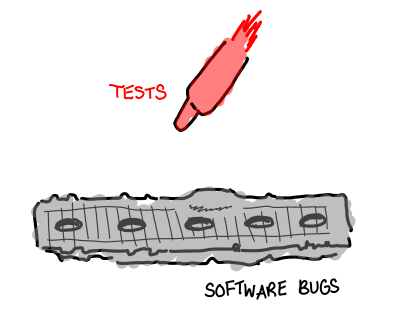
Do you remember your first computer program? When you had finished writing it, what was the first thing you did? You did the simplest possible test: you ran it.
As programs increase in size, so do the amount of possible tests. It’s worth considering which tests we actually end up running: imagine the children’s game Battleship, where the ocean is the space of all possible program executions, the battleships are the bugs that you are looking for, and each individual missile you fire is a test you run (white if the test passes, red if the test fails.) You don’t have infinite missiles, so you have to decide where you are going to send them.
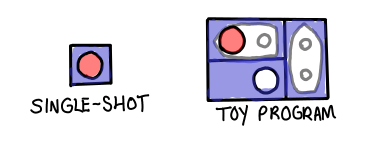
In the case of “your first computer program,” the answer seems pretty obvious: there’s only one way to run the program, only a few cases to test.
But this fantasy is quickly blown away by an encounter with real software. Even if your program has no inputs, hardware, operating system, development environment, and other environmental factors immediately increase the space of tests. Add explicit inputs and nondeterminism to the application, and you’re looking at the difference between a swimming pool and an ocean.
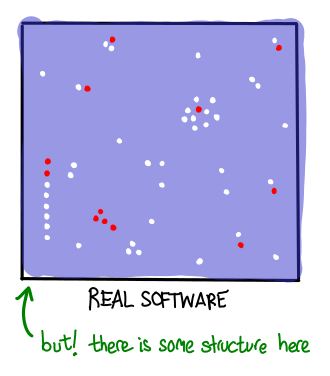
How do we decide what to test? What is our strategy—where do we send more missiles, where do we send less? Different testing strategies result in different distributions of tests on the space of all possible executions. Even though we may not be thinking about the distribution of test cases when we write up tests or run the whole system in an integration test, different test strategies result in different coverage.
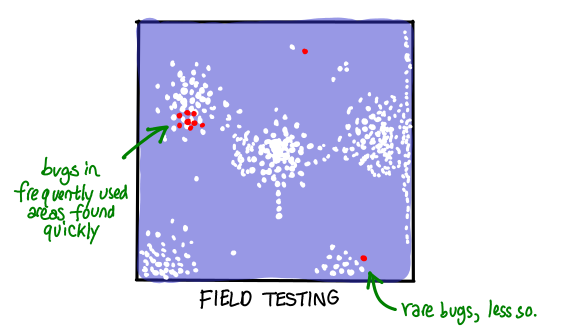
For example, you might decide not to do any tests, and rely on your users to give you bug reports. The result is that you will end up with high coverage in frequently used areas of your application, and much less coverage in the rarely used areas. In some sense, this is an optimal strategy when you have a large user base willing to tolerate failure—though anyone who has run into bugs using software in unusual circumstances might disagree!
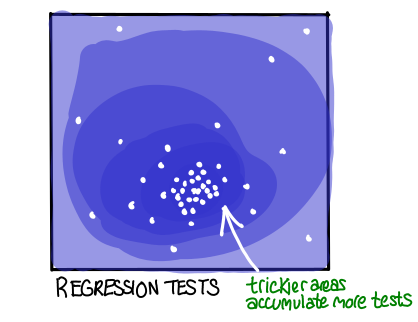
There is a different idea behind regression testing, where you add an automatic test for any bug that occurred in the past. Instead of focusing coverage on frequently used area, a regression test suite will end up concentrated on “tricky” areas of the application, the areas where the most bugs have been found in the past. The hypothesis behind this strategy is that regions of code that historically had bugs are more likely to have bugs in the future.
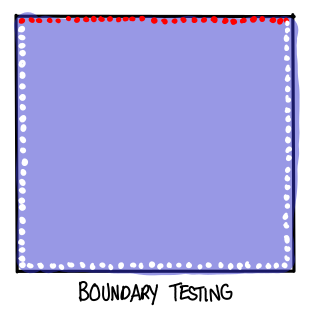
You might even have some a priori hypotheses about where bugs in applications occur; maybe you think that boundary cases in the application are most likely to have bugs. Then you might reasonable focus your testing efforts on those areas on the outset.
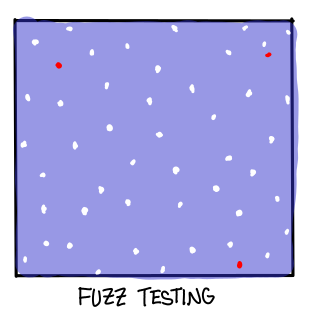
Other testing strategies might focus specifically on the distribution of tests. This is especially important when you are concerned about worst-case behavior (e.g. security vulnerabilities) as opposed to average-case behavior (ordinary bugs.) Fuzz testing, for example, involves randomly spattering the test space without any regard to such things as usage frequency: the result is that you get a lot more distribution on areas that are rarely used and don’t have many discovered bugs.
You might notice, however, that while fuzz testing changes the distribution of tests, it doesn’t give any guarantees. In order to guarantee that there aren’t any bugs, you’d have to test every single input, which in modern software engineering practice is impossible. Actually, there is a very neat piece of technology called the model checker, designed specifically with all manner of tricks for speed to do this kind of exhaustive testing. For limited state spaces, anyway—there are also more recent research projects (e.g. Alloy) which perform this exhaustive testing, but only up to a certain depth.
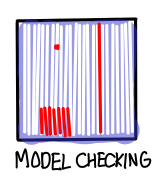
Model checkers are “dumb” in some sense, in that they don’t really understand what the program is trying to do. Another approach we might take is to take advantage of the fact that we know how our program works, in order to pick a few, very carefully designed test inputs, which “generalize” to cover the entire test space. (We’ll make this more precise shortly.)
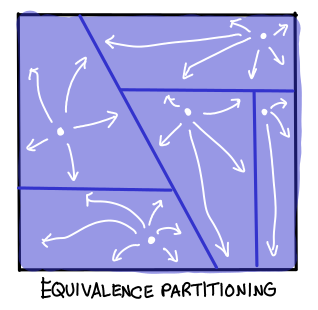
The diagram above is a bit misleading, however: test-cases rarely generalize that readily. One might even say that the ability to generalize behavior of specific tests to the behavior of the program is precisely what distinguishes a good program from a bad one. A bad program is filled with many, many different cases, all of which must be tested individually in order to achieve assurance. A good program is economical in its cases, it tries to be as complex as the problem it tries to solve, and no more.
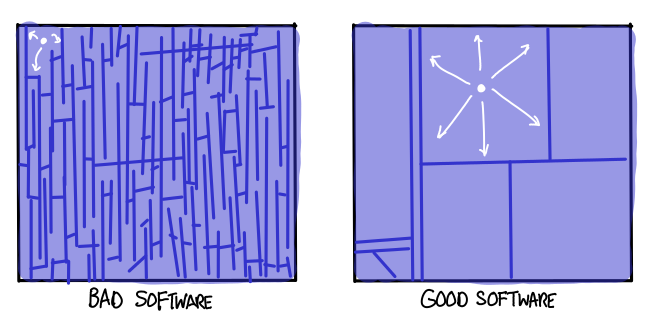
What does it mean to say that a test-case generalizes? My personal belief is that chunks of the test input space which are said to be equivalent to each other correspond to a single case, part of a larger mathematical proof, which can be argued in a self-contained fashion. When you decompose a complicated program into parts in order to explain what it does, each of those parts should correspond to an equivalence partition of the program.
The corollary of this belief is that good programs are easy to prove correct.
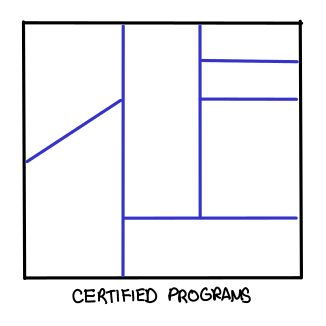
This is a long way from “running the program to see if it works.” But I do think this is a necessary transition for any software engineer interested in making correct and reliable software (regardless of whether or not they use any of the academic tools like model checkers and theorem provers which take advantage of this way of thinking.) At the end of the day, you will still need to write tests. But if you understand the underlying theory behind the distributions of tests you are constructing, you will be much more effective.
Postscript. The relationship between type checking and testing is frequently misunderstood. I think this diagram sums up the relationship well:
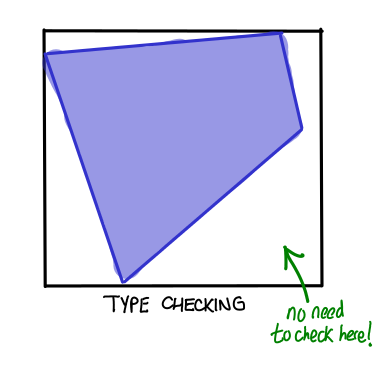
Types eliminate certain regions of bugs and fail to affect others. The idea behind dependent types is to increase these borders until they cover all of the space, but the benefits are very tangible even if you only manage to manage a subset of the test space.

This work is licensed under a Creative Commons Attribution-ShareAlike 3.0 Unported License.
December 18, 2011An “easy”, two-step process:
- Apply this patch for i686. (Why they haven’t fixed this in the trunk, I have no idea.)
- Configure with
CFLAGS="-U_FORTIFY_SOURCE -fno-stack-protector -O2" (this disables fortify source and stack protection which Ubuntu enables by default but interferes with glibc. You need to keep optimizations on, because glibc won’t build without it.) You’ll need to do the usual extra dance of creating a separate build directory and specifying a prefix.
Hope this helps someone else. In case you were wondering why I was building glibc, it’s because I was reporting these two bugs in iconv:
December 17, 2011For the final project in our theoretical computer science and philosophy class taught by Scott Aaronson, Karen Sittig and I decided to create an interactive demonstration of zero-knowledge proofs. (Sorry, the picture below is not clickable.)

For the actually interactive demonstration, click here: http://web.mit.edu/~ezyang/Public/graph/svg.html (you will need a recent version of Firefox or Chrome, since we did our rendering with SVG.)
December 15, 2011Someone recently asked on haskell-beginners how to access an lazy (and potentially infinite) data structure in C. I failed to find some example code on how to do this, so I wrote some myself. May this help you in your C calling Haskell endeavours!
The main file Main.hs:
{-# LANGUAGE ForeignFunctionInterface #-}

import Foreign.C.Types
import Foreign.StablePtr
import Control.Monad

lazy :: [CInt]
lazy = [1..]

main = do
    pLazy <- newStablePtr lazy
    test pLazy -- we let C deallocate the stable pointer with cfree

chead = liftM head . deRefStablePtr
ctail = newStablePtr . tail <=< deRefStablePtr
cfree = freeStablePtr

foreign import ccall test :: StablePtr [CInt] -> IO ()
foreign export ccall chead :: StablePtr [CInt] -> IO CInt
foreign export ccall ctail :: StablePtr [CInt] -> IO (StablePtr [CInt])
foreign export ccall cfree :: StablePtr a -> IO ()
The C file export.c:
#include <HsFFI.h>
#include <stdio.h>
#include "Main_stub.h"

void test(HsStablePtr l1) {
    int x = chead(l1);
    printf("first = %d\n", x);
    HsStablePtr l2 = ctail(l1);
    int y = chead(l2);
    printf("second = %d\n", y);
    cfree(l2);
    cfree(l1);
}
And a simple Cabal file to build it all:
Name:                export
Version:             0.1
Cabal-version:       >=1.2
Build-type:          Simple

Executable export
  Main-is:             Main.hs
  Build-depends:       base
  C-sources:           export.c
Happy hacking!
November 28, 2011Things I should be working on: graduate school personal statements.
What I actually spent the last five hours working on: transparent xmobar.

It uses the horrible “grab Pixmap from root X window” hack. You can grab the patch here but I haven’t put in enough effort to actually make this a configurable option; if you just compile that branch, you’ll get an xmobar that is at 100/255 transparency, tinted black. (The algorithm needs a bit of work to generalize over different tints properly; suggestions solicted!) Maybe someone else will cook up a more polished patch. (Someone should also drum up a more complete set of XRender bindings!)
This works rather nicely with trayer, which support near identical tint and transparency behavior. Trayer also is nice on Oneiric, because it sizes the new battery icon sensibly, whereas stalonetray doesn’t. If you’re wondering why the fonts look antialiased, that’s because I compiled with XFT support.
(And yes, apparently I have 101% battery capacity. Go me!)
Update. Feature has been prettified and made configurable. Adjust alpha in your config file: 0 is transparent, 255 is opaque. I’ve submitted a pull request.